
How to Write a Corporate Video Script Step by Step
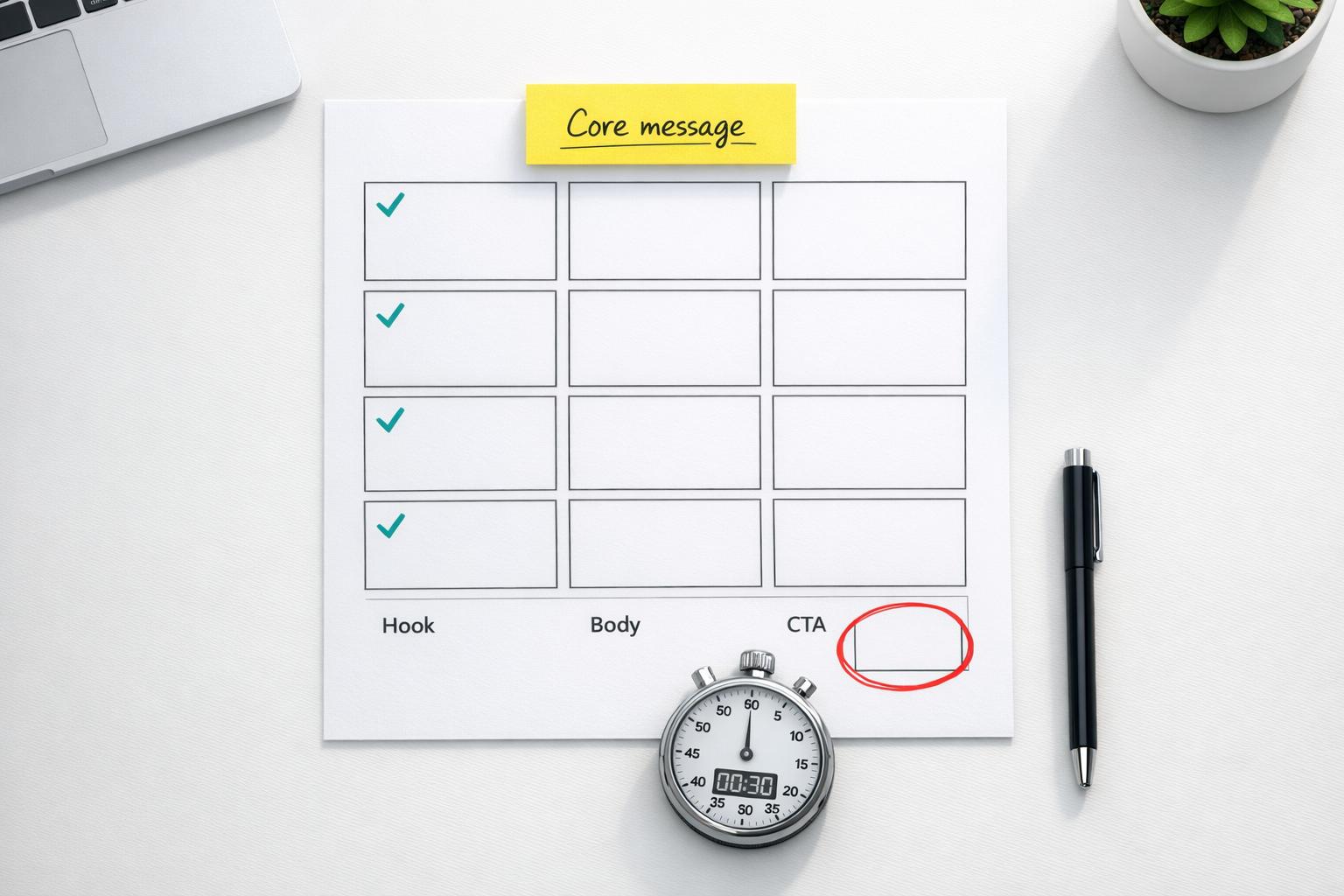
A great corporate video starts with a solid script. Without one, you risk wasting time, money, and losing your audience’s attention. Here’s a quick breakdown of what you need to know:
- Why Scripts Matter: Attention spans are short (just 8 seconds!), and 33% of viewers drop off after 30 seconds. A clear script keeps your message focused, maintains brand identity, and avoids costly production mistakes.
- The Process:
- Define Purpose & Audience: Know your goal and who you’re speaking to.
- Develop a Core Message: Focus on one takeaway, and avoid overloading with details.
- Outline the Script: Use a simple three-part structure: Hook, Body, Call to Action.
- Write the Script: Be concise, engaging, and clear. Every word should serve a purpose.
- Format & Finalize: Use a two-column format for visuals and audio, and check timing.
Key Tip: Keep it short and impactful – 150 words per minute is ideal. A well-written script ensures your video connects with viewers and drives action.
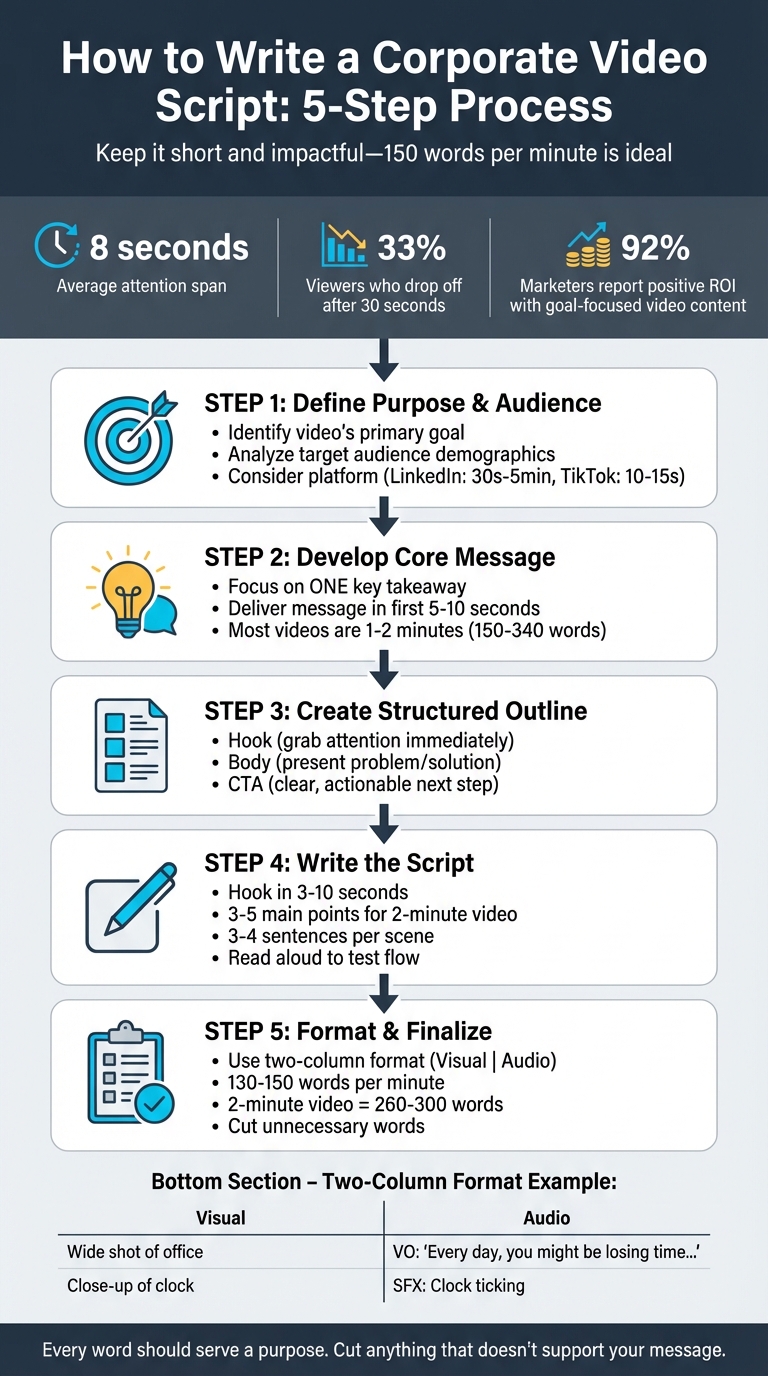
5-Step Corporate Video Script Writing Process
Step 1: Define Your Video’s Purpose and Audience
Start by answering two essential questions: What is the purpose of your video, and who will be watching it? These answers will help you create a focused script that avoids unnecessary distractions.
Identify the Video’s Primary Goal
Your video’s goal is the foundation for every creative decision you make. Whether you’re aiming to generate leads, onboard new hires, or boost brand awareness, the approach you take should align with that purpose. For instance, a recruitment video might use a warm and inviting tone to highlight workplace culture, while a B2B product demo would likely rely on precise, data-backed details. This strategy pays off – 92% of marketers using video report a positive ROI when their content is tied to a clear, measurable business goal.
Think of your goal as a filter. If a line, scene, or visual doesn’t help achieve that specific purpose, it probably doesn’t belong in your script.
Analyze Your Target Audience
Knowing your audience is just as important as knowing your goal. Their preferences will influence everything from the language you use to the video’s length. For example, a video aimed at healthcare professionals might require a formal tone, while a video for everyday consumers should feel more casual and approachable. Jamie Tokarz from TREW Marketing emphasizes this:
"By leading with customer pain points, you can make an impactful opening statement that can clearly resonate with the viewer."
Before you start writing, research your audience’s demographics (age, profession, etc.) and psychographics (interests, challenges, etc.). Also, consider where they’ll be watching. LinkedIn users might engage with videos that are 30 seconds to five minutes long, while TikTok viewers expect snappy clips of 10 to 15 seconds. Adapting your script to these habits ensures it connects with your audience instead of just listing your company’s features.
Once you’ve nailed down your video’s purpose and audience, you’re ready to move on to crafting a compelling core message in the next step.
Step 2: Develop a Clear Core Message
Once you’ve nailed down your purpose and audience, it’s time to focus on one key takeaway. Your script shouldn’t juggle multiple ideas – it should zero in on the single most important message your audience needs to remember. A clear, focused message eliminates confusion and sharpens your call to action. As Pickle Pictures explains:
A well-written script ensures your message is clear, concise, and consistent throughout the video. It eliminates any potential confusion or ambiguity for your audience.
With this central takeaway in place, you can shape your narrative to inspire action.
Identify One Key Takeaway
Ask yourself: What’s the one thing viewers must know to take action? Keep your focus on what truly matters to your audience. Lorenzo Nicolini, CEO of Moonb, suggests a helpful exercise:
Write the core story using five sentences. This forces me to create the ‘story’ skeleton, which I can flesh out later.
This approach forces you to distill your message to its essence, cutting out anything unnecessary.
Instead of highlighting features, address your audience’s pain points. For instance, if you’re promoting a project management tool, don’t make your message about "50 features." Instead, focus on solving a problem: "Stop wasting hours on disorganized tasks." Deliver this message within the first 5 to 10 seconds – before your viewer’s attention drifts. Given that most online videos are just 1–2 minutes long (around 150–340 words), every second counts.
Connect the Message to the Desired Action
Your core message should naturally guide viewers toward the action you want them to take. For example, if your message is "Manual data entry is costing your team 10 hours per week", the next step could be, "Schedule a demo to see how our automation saves time." This creates a seamless link between your message and your call to action.
Review every sentence in your script to ensure it supports your main goal. If a line doesn’t strengthen your core message or reinforce the call to action, cut it. Christopher Powell from Brafton sums it up perfectly:
Brevity is the soul of wit… If you have a sentence with 10 words in it, look for ways to make it 9.
This level of precision keeps your script focused and ensures your message resonates.
Step 3: Create a Structured Script Outline
Building a solid outline is like laying the foundation for a house – it’s what keeps everything stable and organized. Without it, your video risks feeling scattered, which can confuse or lose your audience. As Bryan Johnston, Creative Director at VMG Studios, puts it:
Your script is the soul of your video. There has never been a good movie that had a bad script.
A clear outline ensures your storytelling is logical and that all visual and audio elements work together to amplify your main message.
Apply a Three-Part Structure
The most effective corporate videos stick to a straightforward three-part framework: a hook, a body, and a call to action. This structure keeps your script focused and ensures it flows naturally from start to finish.
- The Hook: This is your attention-grabber, and it needs to land within the first few seconds. Use a surprising fact, a question, or a relatable problem to reel viewers in. A strong hook is crucial because attention spans are short.
- The Body: Here’s where you dive into your core message. Present the problem, explain your solution, or break down a step-by-step process. Stay focused on one main takeaway. For instance, in January 2021, Infinitum Electric used this approach in their corporate overview video. They highlighted a global issue (electricity consumption), backed it with data (CO2 levels), introduced their solution (silicon-based stators), and shared measurable results (10% energy savings). Their script paired technical information with visuals of their modular motor design to simplify complex concepts.
- The Call to Action (CTA): This is where you guide viewers on what to do next. Whether it’s “Schedule a demo,” “Download the guide,” or “Visit our website,” make it clear and actionable. Your CTA should directly tie back to the goal you set in Step 1.
| Script Section | Purpose | Key Elements to Include |
|---|---|---|
| Hook | Grab attention & establish relevance | Anecdotes, surprising stats, or direct questions |
| Body | Share core message & value | Problem/solution, features vs. benefits, supporting data |
| CTA | Prompt specific action | Clear steps like "Sign up", "Contact us", or "Download now" |
Once this framework is in place, you can start aligning your visuals and audio to bring the story to life.
Account for Visual and Audio Components
Your script isn’t just about words – it’s about how those words interact with visuals and sound. Using a two- or three-column format can help you organize this. One column is for narration or dialogue, another for visuals (like footage or graphics), and a third for on-screen text or motion graphics. This ensures every spoken word is paired with a visual cue.
Visual variety is key. Include B-roll footage – secondary shots that complement the main visuals. For example, if your narrator is discussing a software feature, you might show a screen recording or product demo while the voiceover continues. Jamie Tokarz from TREW Marketing points out:
A script that includes detailed visual cues instead is actually just as good, if not better [than a professional storyboard].
Don’t forget sound. Background music, sound effects, and on-screen text all contribute to the emotional tone and pacing of your video. Bernard from Bonomotion emphasizes:
Your story shouldn’t only be told with words, but with sound effects and visuals as well.
To ensure everything flows smoothly, read your outline aloud while picturing the visuals. This helps you test the timing and make sure the language feels natural. Aim for 130 to 150 words per minute of video – a handy benchmark to keep your script concise and engaging.
Step 4: Write the Script
Now it’s time to transform your outline into a script that resonates. Every line should be purposeful, reflecting your brand’s voice and keeping the audience engaged. Aim for clarity, brevity, and impact – each sentence should drive the viewer toward your goal.
Open with a Strong Hook
You’ve got 3 to 10 seconds to grab attention before someone scrolls past. Your opening needs to answer a critical question: “Why should I care?”.
Skip generic intros like "Hi, my name is…" or "In this video, we’ll talk about…" – these tend to lose viewers fast. Instead, ignite curiosity or highlight a problem. For example, rather than saying, "Let’s discuss productivity tips", try: "Every day, you might be losing three hours without even realizing it. Here’s why – and how to fix it.".
Another great approach? Start with a shocking statistic: "Communication failures cost businesses $1.8 trillion every year.". Or ask a provocative question: "What if you could create a month’s worth of video content in just one afternoon?".
Bryan Johnston, Creative Director at VMG Studios, sums it up perfectly:
The hook is the ‘why’ – why your viewer should watch your video. What’s in it for them? What’s the reason they should watch your video and not someone else’s?
Your visuals should amplify the energy of your opening line. Pair bold graphics or dynamic footage with your hook to immediately draw viewers in.
Build the Body with Supporting Information
Once you’ve captured attention, it’s time to deliver on your promise. The body of your script should focus on clear, evidence-backed points that support your hook. A problem/solution framework works well here: first, outline the challenge, then demonstrate how your product or service solves it.
Stick to three to five main points – especially for a two-minute video. Overloading with information can dilute your message.
Back up your claims. Use stats, testimonials, or demos to reinforce your message. For instance, if you’re showcasing a software feature, narrate over a screen recording to provide a visual demonstration. Keep your language conversational and avoid technical jargon.
Christopher Powell from Brafton emphasizes the importance of consistency:
The identity of your brand should be immediately recognizable to fans with every piece of marketing you do, without needing to ever mention your company name
Keep narration concise – 3 to 4 sentences per scene – to avoid overwhelming your audience. Reading your script aloud can help identify unnecessary words and ensure a natural flow. Once your points are clear and concise, guide your viewers seamlessly toward your call to action.
End with a Clear Call to Action
Your script’s final moment should guide viewers to the next step. A specific and direct call to action (CTA) is essential: "Download our app," "Visit our website for details," or "Schedule a demo today.".
Before the CTA, recap your key message to reinforce its value. This brief summary reminds viewers why they should act and adds emotional weight to your conclusion. Avoid abrupt endings like simply flashing a logo or URL – this can feel disjointed and leave the narrative unfinished. Instead, make the CTA a natural extension of your story.
Tailor the CTA to your video’s purpose. For an explainer video, focus on a solution-oriented action. For training content, encourage a follow-up step like a comprehension check. Whatever the goal, ensure your script builds to this moment seamlessly.
Step 5: Format and Finalize Your Script
With your script written, it’s time to prepare it for production. Proper formatting is essential – it ensures that everyone involved in the project understands their role. Even the most compelling script can fall apart during filming if it lacks a clear structure.
Follow Standard Script Formatting
The two-column format is widely used for corporate video scripts. It separates visual elements from audio components, making it easier for team members – like camera operators and sound engineers – to quickly understand what’s required.
- The left column focuses on visuals: shot descriptions (e.g., wide shot, close-up), on-screen text, graphics, B-roll instructions, and any actor movements.
- The right column covers audio: dialogue, voiceovers (labeled as "VO"), music cues, and sound effects (labeled as "SFX"). Each row represents a scene, aligning visuals with their corresponding audio.
Here’s an example of how this format looks:
| Visual (Left) | Audio (Right) |
|---|---|
| Wide shot of an office space. Employee at a desk, appearing frustrated and surrounded by paperwork. | VO: "Every day, you might be losing valuable time without even realizing it." |
| Close-up of a clock ticking. Cut to a calendar with missed deadlines circled. | SFX: Clock ticking. Music: Subtle tension builds. |
| Screen recording of a software dashboard with a highlighted feature. | VO: "Our platform automates routine tasks, giving you back those crucial minutes." |
Use clear markers like "VO" and "SFX" to indicate the timing for dialogue and sound effects. A well-organized script ensures that production runs smoothly and that everyone stays on the same page.
Check Timing and Edit for Clarity
Once your script is formatted, fine-tune its timing and clarity. Read it aloud with a stopwatch to check how long it runs. As a general guide, 150 words equal about one minute of video, though this can vary depending on speaking speed.
Kevin Alster, Strategic Advisor at Synthesia, highlights:
Aim for 130–150 spoken words per minute, which Columbia University research shows is optimal for comprehension.
For a 2-minute video, stick to 260 to 300 words. Don’t forget to account for pauses, transitions, and any visual actions that occur without dialogue – these can add time beyond the spoken script.
As you read, look for areas where the pacing feels off. If certain sections drag, consider shortening sentences. Keep narration to 3–4 sentences per scene to ensure the visuals and audio flow smoothly. Eliminate filler words (like "actually" or "literally") and simplify phrasing. Christopher Powell from Brafton advises:
If you have a sentence with 10 words in it, look for ways to make it 9. Even one or two unnecessary words can make the difference between keeping your audience’s interest and losing it.
Every line should serve a purpose. Cut anything that doesn’t directly support your message. With 33% of viewers dropping off after just 30 seconds, every word needs to pull its weight.
At Dreamtown Creative, we use these formatting and timing techniques to ensure every corporate video script is polished, engaging, and ready for production.
Conclusion
Crafting a corporate video script isn’t about cramming in fancy words or overloading with information – it’s about deliberate planning, a clear structure, and concise messaging. As Bryan Johnston, Creative Director at VMG Studios, wisely explains:
Your script is the soul of your video. There has never been a good movie that had a bad script.
Each step in this process, from outlining your purpose to polishing the final format, is designed to help you create a script that resonates with your audience and inspires action.
The groundwork is crucial. Starting with a creative brief not only keeps your content organized but also saves valuable production time and budget by avoiding unnecessary filming. Using clear, conversational language ensures your brand comes across as approachable and relatable, rather than distant or mechanical. This methodical approach guarantees that every part of your script works together to amplify your message.
Every word in your script should serve a purpose – eliminating fluff and prioritizing impact. By focusing on the essentials, you can create videos that captivate your audience and achieve your goals.
FAQs
How do I choose the right video length for my platform?
The ideal video length varies based on the platform, your audience, and the purpose of your content. For social media, short videos between 15-60 seconds are perfect for capturing attention quickly. On the other hand, platforms like YouTube are better suited for longer videos, typically 2-3 minutes or more, as they allow for more detailed and engaging content.
Focus on keeping your video as brief as possible while still delivering your message clearly. Make sure it matches your audience’s attention span and fits the platform’s format.
What if my script feels too long but still misses key points?
If your script feels too lengthy but still seems incomplete, zero in on the core message. Cut out any unnecessary details and break the content into shorter, more digestible scenes. Make sure every part of the script directly supports your main goals. By trimming repetitive or irrelevant sections, you can keep your script focused and engaging while still covering all the key points effectively. This approach helps maintain viewer interest without losing the intended message.
When should I use voiceover vs. on-camera dialogue?
Voiceover is a powerful tool when you need to clearly communicate information, simplify complex topics, or maintain a polished, professional tone. It’s especially effective for guiding the narrative and establishing credibility, making it a great choice for explainer videos, tutorials, or brand storytelling.
On the other hand, on-camera dialogue shines when you want to connect on a personal level. Featuring your team, a spokesperson, or even satisfied customers can create a sense of authenticity and relatability. This approach works best when the speaker’s delivery feels natural and conversational, helping the audience engage with the message in a more immediate and human way.